Review Comments (0) Screenshots (5) Questions & Answers (0) Votes (1) Awards (4) Wiki  
(1)
2.1-b45
jshot.info
Freeware
76 people
Download JShot

3.53 MBDownloaded 140 times

This software was checked for viruses and was found to contain no viruses.
Click here to see antivirus report.
 
Video tutorial for JShot 2.1
Frame

Review

This is official description

JShot is a free and multiplatform screen capture and uploader application which allows you to capture and annotate a part of your screen and share it via the Internet in one step. It lets you to upload screenshots to the Web or send to an Instant Messaging partner.
 
The following review written by one of the Software Informer contributors applies to version 1.3

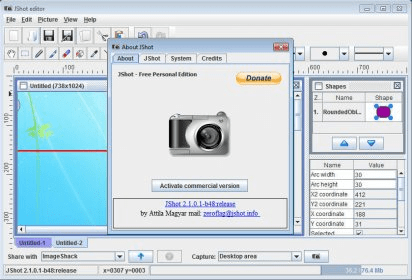
JShot is a program that will let you take screenshots and upload them to ImageShack. You can copy to the clipboard the full screen, a portion of it or just a region used by a widget. Then, you can upload it to ImageShack using your free account. ImageShack will give you a link that you can use to publish your image on some portal, or share it with friends through any instant messenger. If you want, the program can shorten the link using bit.ly URL. Or share your link through a lot of email accounts, social networks and instant messages by using www.addtoany.com.

The program will display each capture in a separate tab in the interface. You can use its built-in editor to modify the image as you want before saving it or sharing it through the Internet. The JShot editor includes every tool you would expect to find in any good image editor, like adding shapes, text, use different pencils and brushes. It will let you save the images in bmp, jpg and png formats. JShot will even allow you to open any image using an external program.
  • It is absolutely free.
  • It uses free online services that will host your image, shorten the URLs and let you share your images with the world.
  • None.

Reviewer rating:

Reviewed: Last year

What's new in version 2.1

- Fixed minus uploader plugin

What's new in version 2.0

The new version has:
* Flamingo components were integrated
* Some user interface improvements were made
* Added a Minus uploader
* Added an experimental webcam frame grabber (win x86)
* Removed JGoodies and Liquidlnf
* Added some improved error handling in the uftp library
* Character encoding bug was fixed in the Twitpic uploader
* Profile chooser dialog is displayed before uploading from context menu
* The last ten recently made screenshots are stored in a history
* Updated Groovy version to 1.7.6
* Added improved error handling for capturing
* The active profile is saved after selecting
# Dropbox plugin supports timestamped file names (yymmdd-hhmmss)
# Updated IzPack installer to 4.3.4
# Some minor fixes were made
The maximum heap memory was reduced to avoid VM initialization problems.
and much more.
Report a wrong version Report a wrong program title Suggest a correction

Screenshots

Main window Main window Main window Main window Main Menu Main Menu Region Capture Region Capture
All 5 screenshots

Latest comments


There are no comments, be the first one!
Add new comment

E-mail Address:

Password:

Register now »

Forgot password?

Sign in with:
Facebook Account
Download Software Informer Client
Copyright © 2012, Informer Technologies, Inc. About| Terms & Privacy| FAQ| Feedback & Support| For Developers